
Bionic Cloud supports media messages via WhatsApp as well as text.
Voice Notes
Voice notes can be identified either by an icon in the Message Queue or by filtering specifically for voice notes.
Voice notes shorter than 3 minutes are transcribed so that the text is can be read and available for the filter and search functions.
When you select a voice note and choose View, the system displays the waveform and allows you to play the audio.
You can then:
- listen to the voice note
- send it to the On Air Queue
- download the audio file
Audio can be previewed at 0.75, 1, 1.5 or 2x real time.
The CLEAN function removes background music/noise helping to make poorly recorded voice notes usable on air. Once cleaned you may preview and download both the cleaned and original audio.
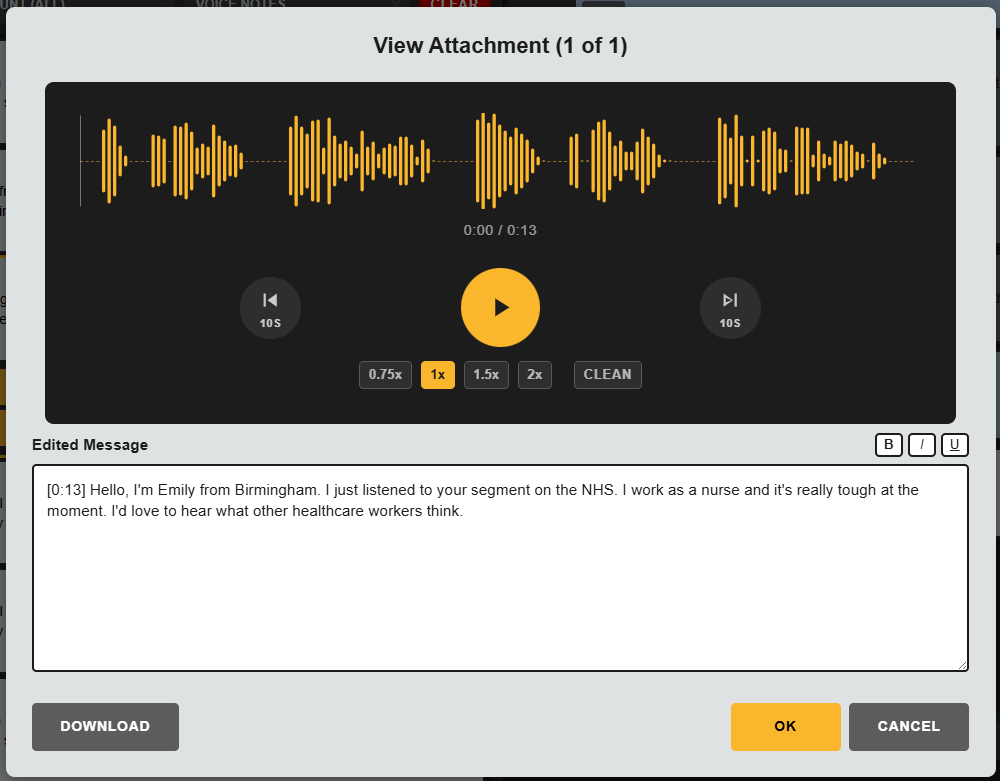
When downloaded, the system converts the voice note into a standard audio file format, making it easier to pass into ingest or playout workflows.
Images
If a message contains an image, selecting View opens a preview of the picture.
You can also download the file through the browser to your desktop if required.
Video
If a message contains video, the View action shows a preview.
As with images and voice notes, video files can also be downloaded.
These media features are useful when audience interaction goes beyond text and includes rich content that may be needed elsewhere in the production workflow.