
Presenter View is the simplified display used by presenters.
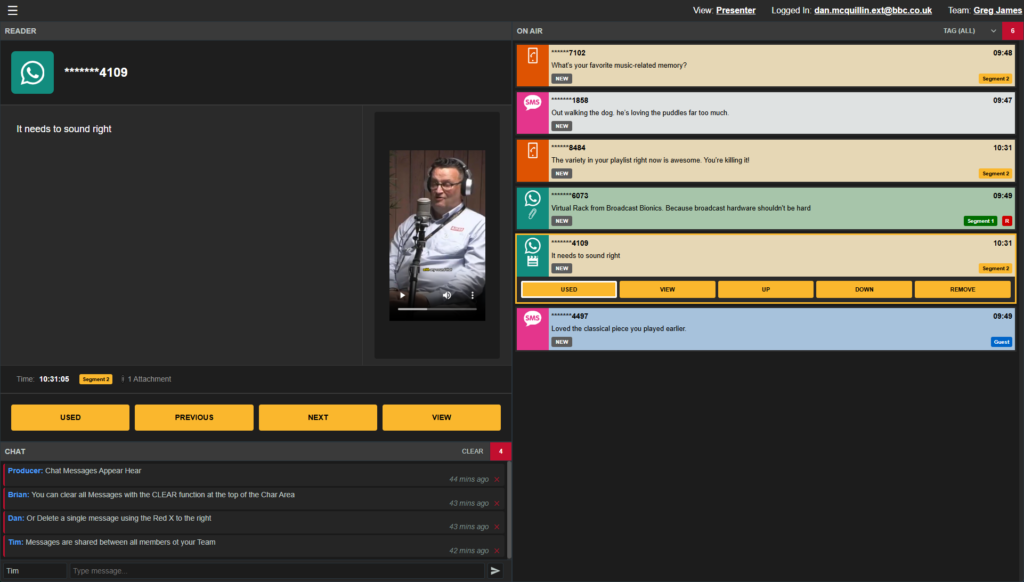
It shows only the messages that have been curated and sent to the On Air Queue. The presenter does not see the raw incoming stream of messages.
What the Presenter Sees
Presenter View provides:
- a clean list of curated messages
- a larger reading panel
- preview of images, video and audio
- optional tag-based filtering
- simple controls for reading and marking messages as used
- ability to preview messages and change message order
The presenter can move up and down to preview thew list and read the currently selected message in the larger panel.
Using Tags in Presenter View
If tags are being used, the presenter can choose to show only the messages for a particular segment or category.
This is useful when the running order changes during a programme, or when different content needs to be surfaced for different moments.
Marking Messages as Used
When the presenter reads a message, pressing Enter marks it as used.
They can also change the order of messages up and down if needed and preview messages witout marking as read or changing the order using next and previous controls.
The result is a focused reading experience that supports live broadcasting without exposing the presenter to unfiltered incoming content.