
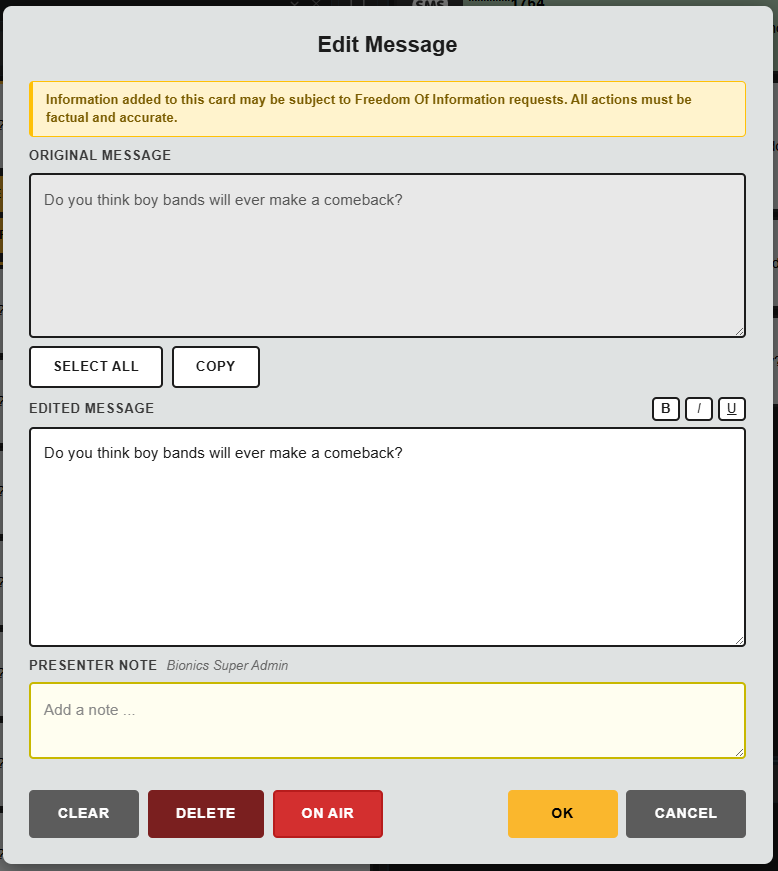
Editing Text
You can shorten a message, tidy it up, or remove irrelevant detail so that the presenter receives the clearest version. This is useful when a contributor sends a long message but only part of it is relevant for the programme.
The tools to the top right of the EDITED MESSAGE window let you set selected text to be bold, italic, underlined or any combination. You can also use the keyboard shortcuts Ctrl + b, i or u to set while editing the text.
The original message text is always available and you can quickly reference or restore the original wording if needed.
Changes made to messages or notes made may be subject to Freedom of Information requests. Any information edited or added must be factual, fair and accurate.
Delete Message
Clicking delete will delete the message from the teams Message Queue.
Presenter Notes
You can attach an internal Presenter Note to a message.

Presenter notes appear above the message in the On Air Queue so that presenters see the instruction or context first.
A note might be used to indicate:
- pronunciation guidance
- context for the presenter
- whether a message has been verified
- whether a message is part of a competition or feature