
Opening a pending request displays the full block details.
The administrator can review:
- Block Scope – the level at which the block will apply;
- Expiry – whether the block expires on a specified date or never expires;
- Show – where the block applies;
- Sender Information – the sender or identity associated with the request;
- Requested By – the user who submitted the request;
- Notes / Reason – the reason supplied for requesting the block.
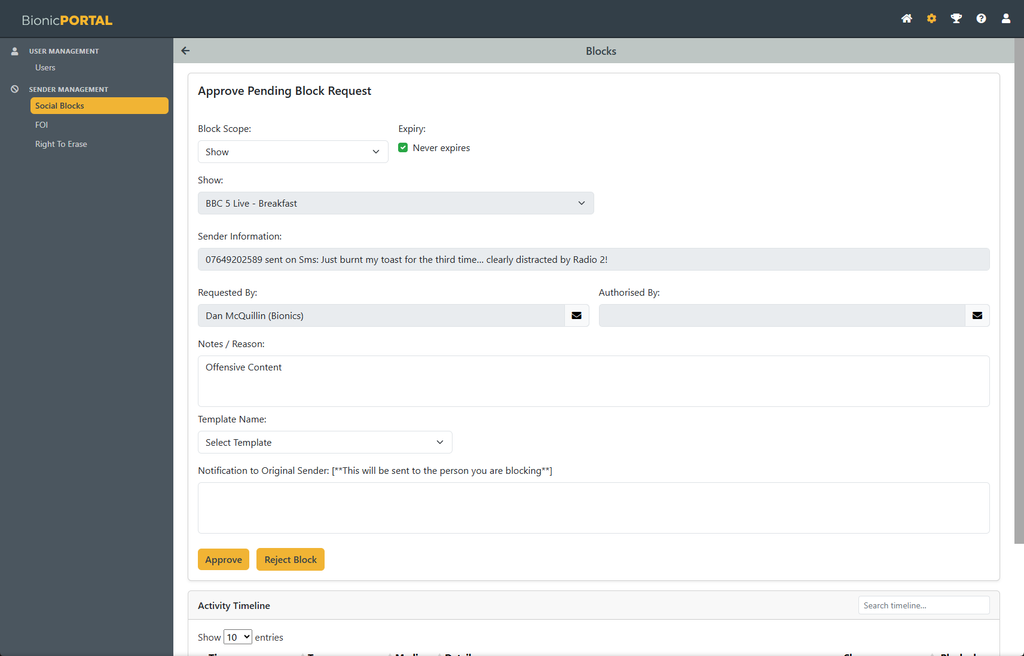
Where required, the administrator can amend the scope or expiry before making a decision.
Select Approve to activate the block.
Select Reject Block if the request should not be applied.
Once approved, the block becomes active according to the selected scope and expiry settings.
Notifying the Sender
When approving a block, an administrator can optionally send a notification to the original sender.
A predefined Template can be selected where available, or the notification text can be entered directly.
The notification field shows the message that will be sent to the person being blocked.
If no notification is required, the block can still be approved without sending a message.
Activity Timeline
Each block includes an Activity Timeline showing the history associated with that sender and block request.
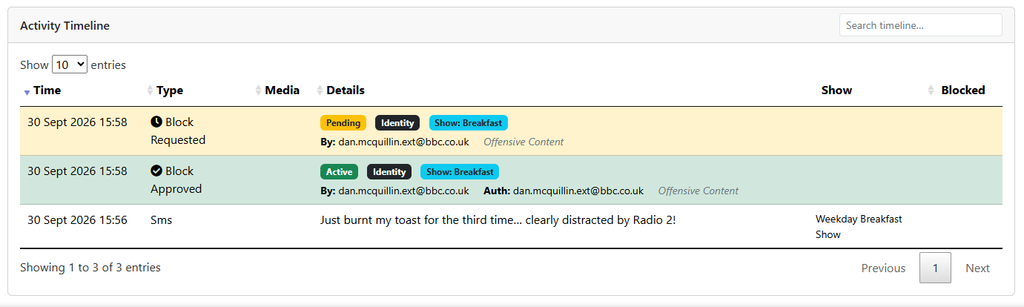
The timeline can include:
- the original incoming message;
- when the block was requested;
- who requested it;
- when the block was approved;
- who authorised it;
- the scope of the block; and
- its current status.
- Messages Blocked and not sent onward for Curation
This provides an audit trail showing how and why the block was created.